
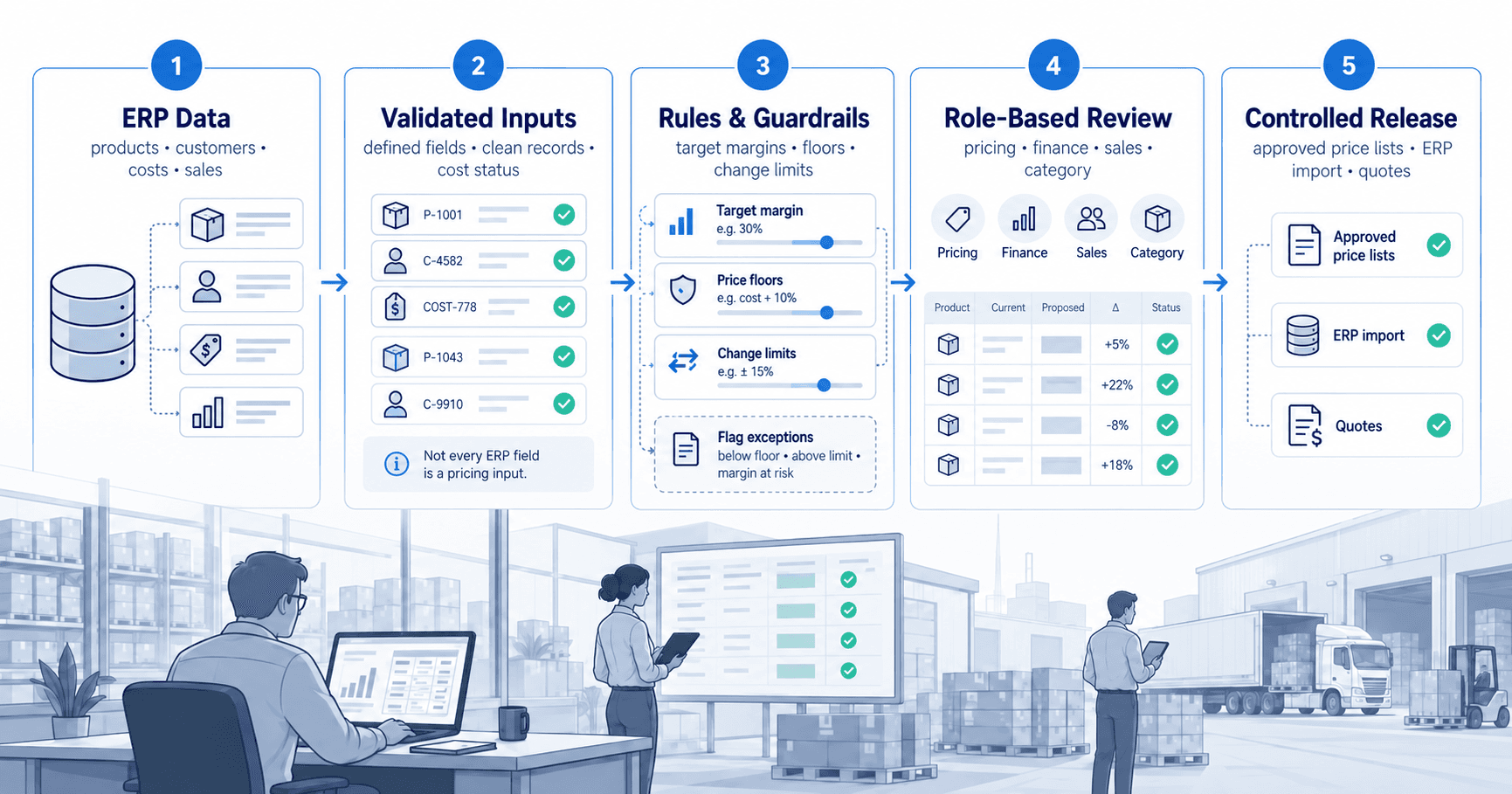
The proposed price may reflect the right cost, margin target, and market position, yet the underlying item record could be outdated, a customer exception may be missed, or the approved result may not reach the system used by sales.
For distributors and manufacturers with large catalogs, the ERP remains a critical system of record. It holds item masters, costs, customer records, inventory positions, transaction history, and often the current price structure. But an ERP is not always designed to organize the commercial reasoning behind a price decision. That gap creates manual work, inconsistent exceptions, and limited visibility into what changed, why it changed, and what decision led to the result.
Start by Defining the Role of ERP Data in Pricing
The first question is not which connector to deploy. It is which ERP fields should influence a pricing decision and which fields are simply needed to identify the right product, customer, or transaction.
At a minimum, pricing teams commonly need product identifiers, descriptions, categories, units of measure, active status, standard or landed cost, current list price, customer or customer-group assignments, and historical sales quantities and revenue. Depending on the business, inventory availability, vendor relationships, rebates, freight components, and contract indicators may also be relevant.
Not every field should be treated as a pricing input. A large data extract can make review harder if it brings in fields with unclear ownership or inconsistent definitions. For example, a cost field may represent a last purchase cost, a standard cost, or a fully landed cost. Each can be useful, but they support different commercial decisions. Before connecting data, establish which definition will be used for each pricing use case.
This is where finance, operations, category management, and pricing should align. The objective is a shared pricing dataset, not a broad copy of the ERP database.
Build a Reliable Product and Customer Foundation
A pricing process cannot compensate for weak master data indefinitely. If the same item appears under multiple identifiers, categories are incomplete, units of measure are inconsistent, or customer hierarchies do not reflect how accounts are managed, pricing rules will produce avoidable exceptions.
Begin with the identifiers that allow records to be matched consistently. Item number, branch or warehouse context where relevant, customer account, customer group, currency, and unit of measure should be handled explicitly. A price per each is not interchangeable with a price per case, and a customer-level agreement should not be overwritten by a broader segment rule without review.
This does not mean teams must wait for a perfect ERP cleanup before improving pricing operations. In many cases, the practical approach is to identify the data issues that directly affect price execution, establish exceptions for them, and assign owners to correct the source records over time. The key is visibility. Pricing users need to know when a record is incomplete or cannot be confidently included in a rule-driven change.
Treat Cost Status as Part of the Decision
Cost is often imported as if it were a settled fact. In practice, it may be missing, stale, provisional, or valid only for a particular supplier, location, or buying condition. A pricing system should preserve that context rather than calculate a suggested price from an unqualified value.
For items with uncertain cost, the appropriate action may be to hold the current price, flag the item for review, or apply a temporary rule with a defined margin floor. This is preferable to publishing a broad catalog change based on incomplete cost information.
Separate Data Intake From Pricing Decisions
Once ERP records are available, the next discipline is separating data movement from decision-making. An import should not automatically become a price change. Data must be validated, compared with the prior state, and placed in a process where the commercial impact can be assessed.
A useful intake process identifies what changed since the previous load. New items, discontinued items, cost movements, category reassignments, customer changes, and unexpected blanks should be visible before they affect calculations. Pricing teams can then focus their attention on material changes instead of reviewing the entire catalog every time data is refreshed.
The cadence depends on the business. Some organizations need frequent cost and inventory updates; others manage monthly or quarterly list changes. The right frequency reflects data volatility, catalog size, approval capacity, and the speed at which sales teams need updated prices. More frequent data is valuable only when the review and execution process can keep pace with it.
Use Rules to Create Consistency, Not Automatic Decisions
Pricing rules translate commercial policy into repeatable action. They may set target margins by category, define minimum margins by customer tier, calculate price increases from cost movement, or establish rounding conventions for published lists. Rules reduce repetitive manual calculation and make policy more consistent across a large item base.
They should not remove judgment. A low-volume specialty item, a strategic account, a contract commitment, or a competitive market condition may require a different decision than the rule suggests. The purpose of a rule is to make the standard path clear and to expose the exceptions that deserve human attention.
A governed pricing environment should show the proposed price alongside the inputs that produced it: prior price, current cost, target margin, change percentage, sales volume, and any relevant rule. Reviewers should be able to understand the recommendation without rebuilding the calculation in a separate workbook.
NewAxiom supports this approach by bringing connected product, cost, sales, demand, and pricing information into dedicated workbenches where teams can review proposed actions before they are executed.
Set Guardrails Before the Review Begins
Margin floors, maximum change thresholds, and category-specific rules should be defined before a pricing event reaches review. Otherwise, teams spend time debating routine decisions that could have been handled through established policy.
Guardrails also make exceptions easier to prioritize. An item that moves within an expected range may require little attention. An item that falls below a margin floor, exceeds a change threshold, or conflicts with a customer agreement should be highlighted for a deliberate decision. This directs experienced judgment to the cases where it has the most value.
Design Review Around Responsibility
ERP data can support the calculation, but it cannot establish responsibility for a commercial decision on its own. Pricing changes often affect multiple functions: category teams understand market context, finance monitors margin exposure, sales owns customer relationships, and operations needs executable outputs. The review process should make those responsibilities clear without adding unnecessary steps to routine changes.
Define who is responsible for preparing, reviewing, and releasing pricing changes. Higher-risk changes may warrant additional review, while routine changes within established guardrails can move through the process with less intervention.
When a price is intentionally overridden, preserve enough context to explain the decision. A short explanation such as contract renewal, competitive response, inventory clearance, or strategic account protection is more useful than an unexplained number. Recurring overrides can also reveal where standard rules no longer match commercial reality.
Publish Reviewed Outcomes in Usable Forms
The process is incomplete until reviewed pricing becomes available to the teams and systems that need it. Depending on the operating model, that may mean an ERP import, a controlled price list, an account-specific quote, or an export for downstream execution.
This stage requires the same care as data intake. Verify effective dates, currencies, units of measure, customer applicability, and the intended destination. A correct price applied to the wrong customer group is still a pricing failure.
Maintain a clear distinction between proposed pricing, reviewed pricing that is ready for execution, and published pricing. Without that distinction, sales and customer service may act on numbers that are still under review, while pricing teams lose confidence in the status of the catalog. Status visibility is a practical control, particularly when multiple pricing events are active at once.
Measure Whether the Connection Is Improving Decisions
A successful ERP-to-pricing connection should reduce more than manual data handling. It should improve the quality and speed of pricing operations. Useful measures include the time from validated data intake to publication, the number of items requiring manual intervention, margin exposure in proposed changes, exception volume by category, and the percentage of changes released on schedule.
Also examine recurring exceptions. If the same product family, customer group, or cost condition repeatedly requires overrides, the issue may be a rule design problem, a master-data problem, or a valid commercial policy that has not yet been formalized. Repeated exceptions are operational signals, not just administrative noise.
The practical aim is not to make every price automatic. It is to ensure that every price decision starts with trusted data, follows the right controls, and reaches execution with its commercial intent intact. When that discipline is in place, ERP data becomes a dependable input to pricing rather than another source of reconciliation work.